
 |
| Brinsea Mini Advance incubator |
**Buying a Brinsea product? Enter the word "COOP" at checkout and save 10%!!
When shopping for an incubator, look no further than the
Brinsea Mini Advance. This model is not intended for those looking to hatch large quantities of eggs at one single time. Those folks looking to hatch a greater amount of eggs, should look into one of Brinsea's larger models. The total capacity for the Brinsea Mini Advance model is 7 Large eggs or 12 Quail eggs. For me, I find the size a perfect fit for my needs. Anything larger and I would quickly find myself over run with birds!
Upon arrival of your new Brinsea Mini Advance incubator, you will immediately see this company is truly proud of their products craftsmanship by how well packaged everything is and the literature that accompanies it. The parts included are: (1) Incubator with the removable lid, (1) Egg disc, (1) Water Pot Guard, the 115volt power supply unit, a catalog, the user instruction pamphlet, a how to care for your chicks paper, and a free extend 2 year guarantee notice.
Simplicity has been achieved with the Mini Advanced's use of a digital control system and powered fan. The control system is located on the very top of this model just over the heating element and fan, and utilizes three buttons to customize the settings to suit your needs. The digital display "utilizes a highly accurate individually calibrated sensor for temperature" so no more need for multiple thermometers to confirm your temperature. You can adjust the temperature and have it displayed in either Celsius or Fahrenheit, and it reads to the tenth of a degree.
The digital display feature is loaded with a bunch of optional settings which include, Power Loss Display, High Temperature Alarm, Low Temperature Alarm, multiple turning adjustments, Cooling period feature ( used to simulate mother hen getting off of her eggs), a countdown to hatch calendar, and of course the option to save or cancel your settings. I am totally impressed with the many turning adjustments which (briefly) include: "Auto" off on 2 days to hatch, turning interval timing, and turning angles which change the distance of the turn.
In my opinion, the "only" things that can make this digital control system any better, would be the use of a back light on the display screen, and a humidity gauge (available on the EX model only). Almost all digital displays these days have some sort of backlight. The lack of a humidity gauge really isn't "needed" in this particular model though because of the two section water pot located in the center. Up until "lock down" you fill only half of the pot with water and at the two days until hatch period, you fill the second half. Many people confirm this will put you at the perfect humidity level for hatching most types of poultry.
In closing, if you are looking into hatching your own birds for the first time or are an experienced small scaled hatcher, the Brinsea Mini Advanced is not only the best value on the market but the overall best choice. Cheers! ~ Kevin
**Update: Almost 3 years later and after many successful hatches, I still find this to be one of the best and most convenient incubators I have ever used. I especially appreciate how our kids are able to observe the entire hatching process and watch the wonderful miracle of birth!
~ Kevin
Contact:
Brinsea Products Inc.
704 N. Dixie Avenue
Titusville
Florida
FL 32796
USA
Phone (888) 667 7009
Web http://www.brinsea.com
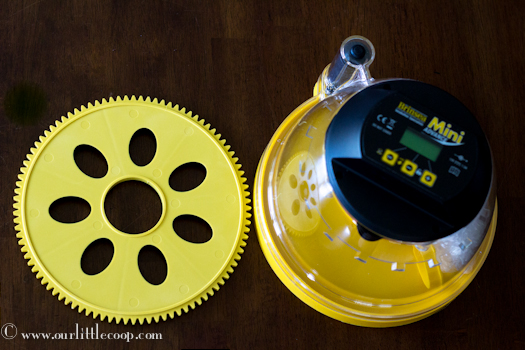
The Mini Advance was designed for optimal 360 degree viewing of your incubating and hatching eggs thus making it the perfect choice for photographers looking for the best angles to take pictures or classrooms where this incubator can take center stage!
 |
| Nicely Packaged |
 |
| Digital Control System |
 |
| Powered Fan |
The digital display feature is loaded with a bunch of optional settings which include, Power Loss Display, High Temperature Alarm, Low Temperature Alarm, multiple turning adjustments, Cooling period feature ( used to simulate mother hen getting off of her eggs), a countdown to hatch calendar, and of course the option to save or cancel your settings. I am totally impressed with the many turning adjustments which (briefly) include: "Auto" off on 2 days to hatch, turning interval timing, and turning angles which change the distance of the turn.
 |
| Brinsea Mini Advance Incubator |
In my opinion, the "only" things that can make this digital control system any better, would be the use of a back light on the display screen, and a humidity gauge (available on the EX model only). Almost all digital displays these days have some sort of backlight. The lack of a humidity gauge really isn't "needed" in this particular model though because of the two section water pot located in the center. Up until "lock down" you fill only half of the pot with water and at the two days until hatch period, you fill the second half. Many people confirm this will put you at the perfect humidity level for hatching most types of poultry.
In closing, if you are looking into hatching your own birds for the first time or are an experienced small scaled hatcher, the Brinsea Mini Advanced is not only the best value on the market but the overall best choice. Cheers! ~ Kevin
**Update: Almost 3 years later and after many successful hatches, I still find this to be one of the best and most convenient incubators I have ever used. I especially appreciate how our kids are able to observe the entire hatching process and watch the wonderful miracle of birth!
~ Kevin
Contact:
Brinsea Products Inc.
704 N. Dixie Avenue
Titusville
Florida
FL 32796
USA
Phone (888) 667 7009
Web http://www.brinsea.com


